This is an old revision of the document!
Table of Contents
Controls
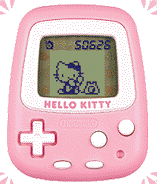
- Directional Keys = Navigating menus
- A = Select
- B = Return
- Start = Settings
- Select = Friend Note
- Reset = Reset ALL progress
Top Menu
Alarm

Select a time to activate the alarm and toggle the alarm on or off.
Chest

Browse items in your chest. Press A to select a drawer. Press A again to use up an item. Press B to return back to the main chest.
Hello Kitty Forest

Pay 25 Kitt to visit the Hello Kitty Forest. In the forest, select a path by pressing either up or down. The deeper you go into the forest, the rarer the items become.
Select: Friend Note
The Friend Note will show you the friends you have made in the order you met them. It will also show the total number of steps you have taken with the device, which is helpful for unlocking certain items and characters.
Start: Menu
Reset
This option will reset your steps shown in the top right corner without resetting your progress overall. You can reset at the beginning of the day to get a daily step count.
Sound
Toggle sound on and off.
Clock Set
Use this to change the clock time after first boot.